Cork board: a lounge screen of family photos and a voice face
A lounge screen dressed as a cork board that plays family photos with AI captions from a self-hosted Immich, and shows what the voice assistant heard.
- Difficulty
- Advanced
- Parts cost
- Free software, plus about US$0.003 per AI photo caption
- Build time
- Built over five days, in stages
- Skills
- Home Assistant, Docker, Python, JavaScript, Linux kiosk
The problem
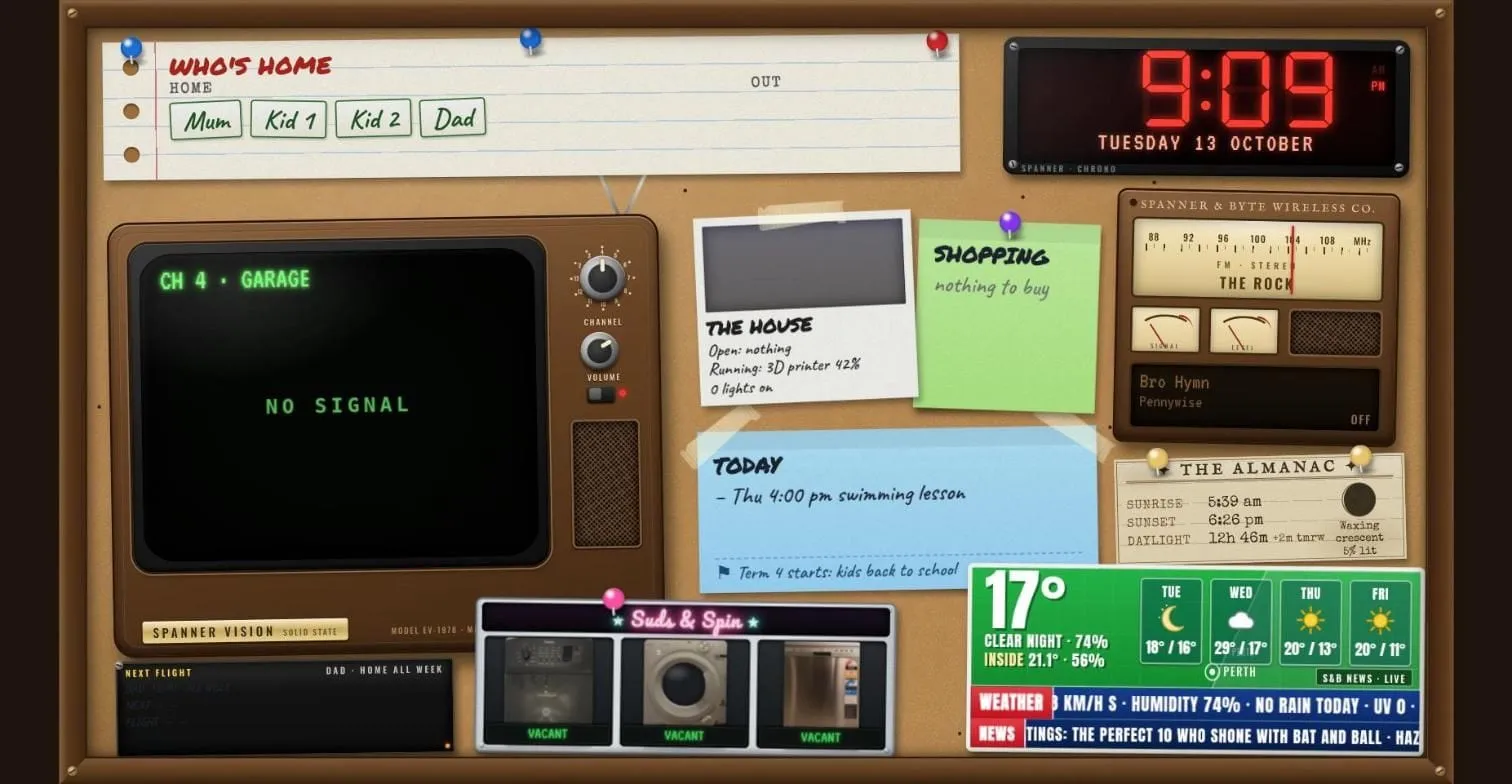
There’s a screen in our lounge that I wanted to be part of the room, not another dashboard full of buttons. So it’s dressed up as a cork board: a retro TV, notes, a clock and the weather, pinned to wood. Then I wanted two more things from it.
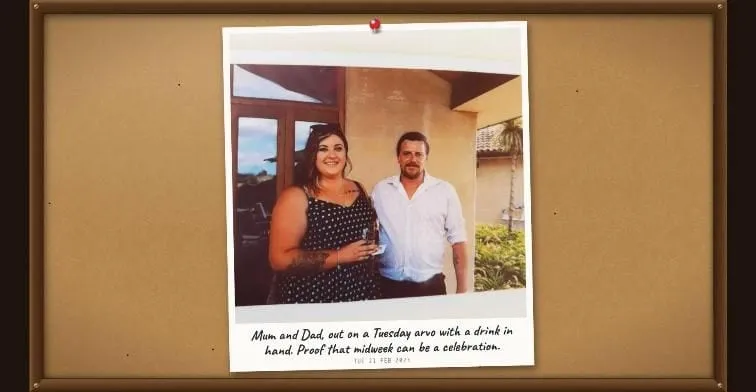
First, family photos. Everyone takes photos on their phones and nobody ever looks at them again. I wanted the kids and my partner to be able to send a photo to the board from their phone, have it turn up as a Polaroid with a handwritten caption, and never have to type that caption themselves.
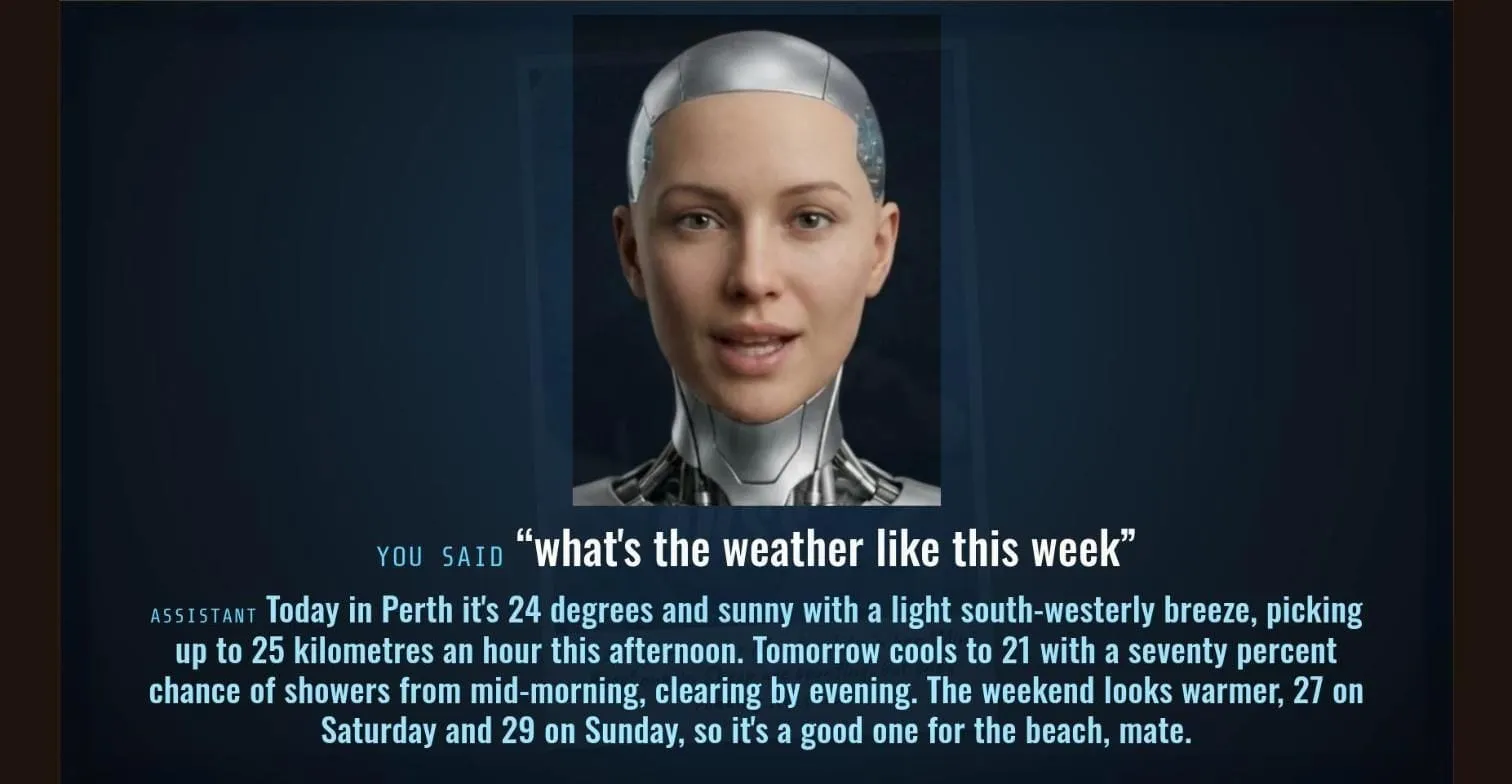
Second, the voice assistant. On a bad voice day you can’t tell whether it misheard you or misunderstood you. Those are two different problems with two different fixes. So when someone says the wake word in the lounge, the board now shows a face, exactly what it heard, and what it said back.
How it works
Photos. The photos live in Immich, a self-hosted photo library (think Google Photos, but on your own server). Immich finds faces on its own server, and I name them once. A small service I wrote, called photo-board, sits beside it. It has a phone page for uploading, and a caption worker that waits until Immich has finished finding the faces, lists the named people from left to right, and asks an AI model (Claude Sonnet, through OpenRouter) for one caption. The caption is stored once and never asked for again unless the names change. Only photos added through the photo-board page go on the board, not the whole library.
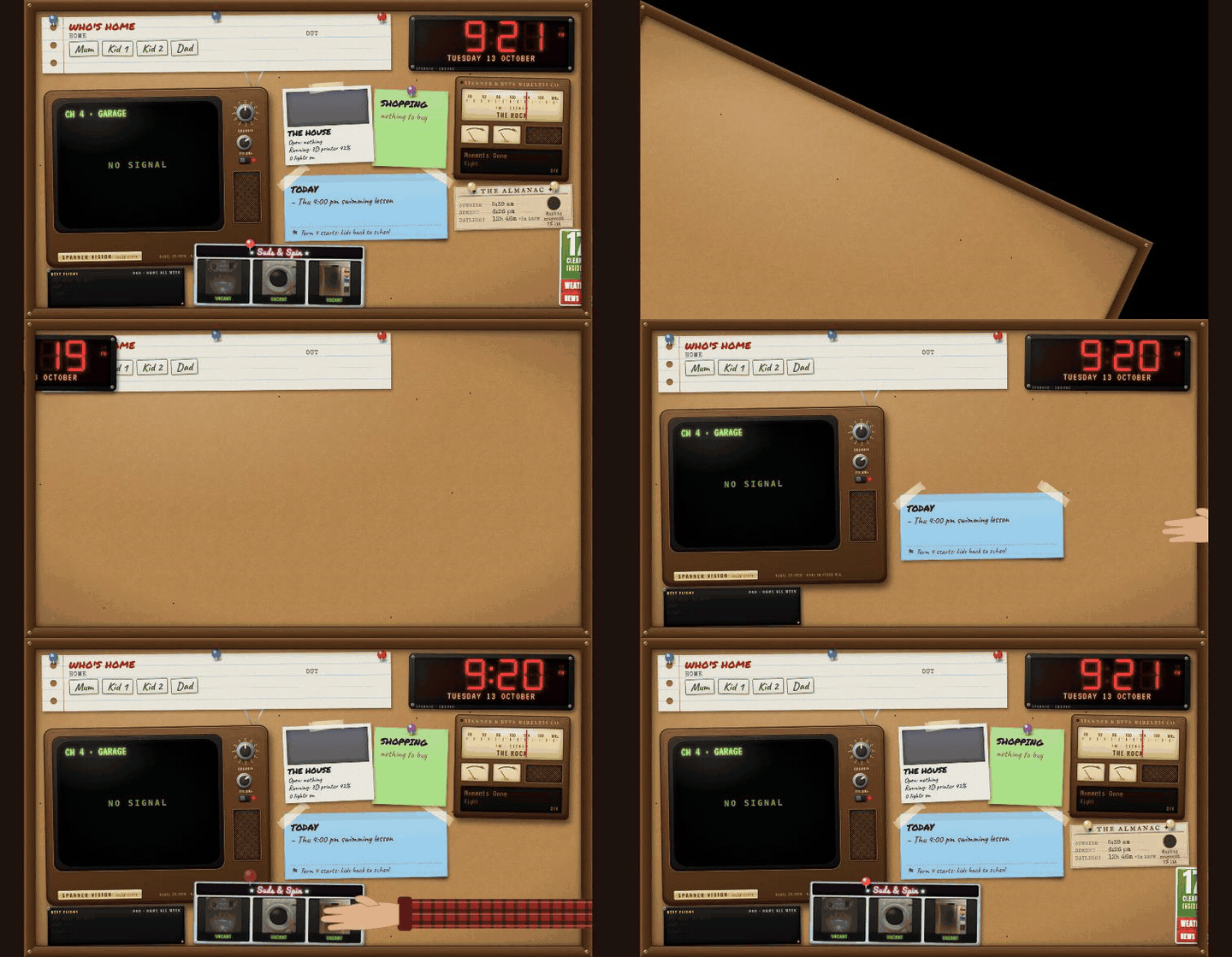
The board. A second service on my home server serves the board page itself. The screen in the lounge is a Raspberry Pi 5 driving an ordinary PC monitor over HDMI, running Chromium full-screen, and the Pi only ever talks to that one service. It’s the Pi that used to run Home Assistant before that moved off it. It started life as the lounge radio. The board sits there for 5 minutes, then clears itself off in one of three ways picked at random: things fall off (gravity), blow away (wind), or the whole board falls off the wall, the screen goes black and two cartoon arms hang it back up, empty. Then about 8 slides play for 12 seconds each, either one Polaroid or three from the same day, with a handwritten caption and the date and place. Then the board comes back, again at random: items pinned one at a time, dropped in, blown in, or an arm pulls the last photo off and re-pins everything. No photo repeats until every photo has been shown, and new photos join the queue straight away.
What wins. The retro TV on the board shows a live camera feed. When someone walks onto the driveway, the TV drops onto the board over the dimmed photos, and leaves 30 seconds after they’ve gone. If they stay, or the sensor sticks, it leaves after 2 minutes anyway and won’t come back until the sensor has cleared once. When nobody is in the room, everything goes back to normal at once and the cycle pauses. If the presence sensor is unknown or unavailable, the board treats the room as occupied.
The voice face. The board server keeps one read-only connection open to Home Assistant (a websocket: a connection that stays open so Home Assistant can push updates). When the lounge voice unit starts listening, the board server asks Home Assistant’s voice debug log for that run every 150 ms and pushes it to the screen. The board fades to an animated face and shows YOU SAID (exactly what the speech-to-text heard) and the assistant’s reply, typed out as it arrives. From Home Assistant to the screen measured about 0.2 seconds. It goes back to the board 6 seconds after the assistant finishes.
What you need
- A Raspberry Pi 5 and a monitor. No touch needed, it’s just a PC monitor on HDMI. Mine is a 4 GB Pi 5, the one that used to run Home Assistant, with Raspberry Pi OS Desktop and Chromium in kiosk mode (full-screen, no address bar).
- A home server that runs Docker (for Immich) and the two small Python services.
- An external drive for the photo library.
- Immich: immich.app. Mine is v3.2.4.
- An OpenRouter account for the captions: openrouter.ai. Put a spending limit on the key.
- Home Assistant with a working voice assistant, and a voice unit in the room. Mine is a reSpeaker XVF3800 running ESPHome, with “okay nabu” as the wake word.
- A presence sensor for the room, so the board knows when nobody’s there.
- For the face: an AI-made portrait and LivePortrait to animate it: github.com/KwaiVGI/LivePortrait.
Hardware and screen
There’s no wiring. It’s all on the network:
| Part | Where it lives | What it does |
|---|---|---|
| Raspberry Pi 5 + PC monitor | The lounge | Chromium full-screen, showing the board page. Nothing else. |
| Home server | Out of sight | Runs Immich, photo-board and the board server. |
| External drive | Plugged into the home server | Holds the Immich photo library and a second copy of the backups. |
| Voice unit | The lounge | Hears the wake word. The board only watches it, it never talks to it. |
| Presence sensor | The lounge | Tells the board the room is empty, so it pauses. |
The Pi reloads the board by itself within 5 seconds of the board page changing on the server, so I never have to touch the Pi to update it.
The Pi: Chromium kiosk
Raspberry Pi OS Desktop, set to log in by itself (sudo raspi-config nonint do_boot_behaviour B4) with
screen blanking off (sudo raspi-config nonint do_blanking 1). The desktop is labwc, a Wayland one, and it
starts Chromium from its autostart file:
# ~/.config/labwc/autostart
rm -f ~/.config/chromium/Singleton*
chromium --ozone-platform=wayland --password-store=basic --kiosk http://YOUR_SERVER:PORT/ &
Each of those bits is there because something went wrong without it. Changing the Pi’s name left a
Chromium lock file behind, and Chromium then refused to start because it thought it was “in use on another
computer”, so the lock files get deleted every boot. A brand new user gets a keyring password prompt that
sits over the kiosk, and --password-store=basic stops it. And if you start Chromium from an SSH session
it picks the old X11 display mode unless you tell it Wayland.
Services and config
The photo-board and board server code isn’t published yet, so this section describes how they work rather than giving you the files.
Immich: refuse to start without the drive
The photo library is on the external drive. If the drive isn’t mounted, Docker would normally create an
empty folder in its place and Immich would happily start writing photos to the wrong disk. Using the long
form of the volume with create_host_path: false stops that: Immich refuses to start if the drive is
missing. I tested that it does.
# docker-compose.yml, under the immich-server service
    volumes:
      - type: bind
        source: /mnt/external/immich/library
        target: /data
        bind:
          create_host_path: false
In Immich’s settings I have face recognition on and smart search off. Face names belong to one account, so the board only uses one library (mine). Name the faces in that account.
photo-board: the upload page
On the phone: pick your name, tap Add photos, choose from the gallery, then a preview step shows the thumbnails. You can remove any with ✕ and add an optional hint for the caption. Nothing is sent until you press Upload N photos. It then shows “Uploading 3 of 12…” and a tick when it’s done. The same page lists your photos so you can edit or redo a caption or delete one. Touching someone else’s photos needs a parent PIN.
photo-board: the caption worker
- Wait at least 2 minutes after upload, and until Immich’s face-finding queues are idle (30 minutes at most).
- Read the face boxes and list the named people left to right. Keep one box per face (see the lessons).
- Ask the model for one caption, and store it.
- If the call fails, retry after 1 minute, then after 10 minutes. After that, mark it failed and show a date and place caption instead.
- Once an hour, and every time the service starts, compare each AI caption’s named people with Immich’s current face names. If someone’s been named or renamed since, redo that caption once. Captions I’ve edited by hand are never touched.
The part of the request that matters (the messages go in as normal):
{
  "model": "anthropic/claude-sonnet-5.5",
  "max_tokens": 1500,
  "reasoning": { "effort": "low" }
}
The lessons explain why those last two lines are there.
Two money limits, belt and braces: the OpenRouter key itself has a US$10 limit, and photo-board refuses to spend more than US$5 a month in its own code. When the budget’s hit, new photos just get the date and place caption. The service runs with one uvicorn worker (uvicorn is the Python web server), because the caption worker must only run once.
Photos are sent to the board whole, never cropped: 900 px on the long edge for a single, 600 px for a trio, after trimming plain black or white bars off the edges. The board builds each Polaroid as big as its space allows, then shrinks the photo until the photo and the whole caption fit, so a tall screenshot still gets a caption you can read.
What the board asks photo-board for:
GET /api/slides?n=8
  -> { round, slides: [ { type: "single" | "trio",
                          photos: [ { id, url, caption, meta } ] } ] }

GET /img/<id>.webp?w=900      (w=600 for a trio)
Each call moves the no-repeat rotation along.
The board server and page
A small Python server serves the board page, passes the slides and photos through from photo-board, and reports the presence flags from Home Assistant. The page itself is split into a state machine that only decides what happens next (board, exit, slides, return, voice) and a choreography file that only moves things. Animations only ever use move, rotate, scale and fade.
The voice face is four short video clips (idle, listening, thinking, speaking), each 390×520 and about 65 KB, loaded up front so only one plays at a time. If a clip freezes, it falls back to a drawn robot. I made the portrait with an image model through OpenRouter and animated it with LivePortrait on the home server’s CPU, about 3.5 minutes per clip. Check the licence before you do the same: the InsightFace face models LivePortrait uses are non-commercial only.
Who wins on the screen: the camera TV always beats the voice face, and a dark board is never woken by the voice face. The face also gives up after 6 seconds of quiet, 20 seconds after the final reply, or 60 seconds total, whichever comes first. If the voice part fails to load, the feature turns itself off and the board carries on.
Since round two, the board keeps its own log of every voice run for 6 months, shows error codes, and adds a “✓ did” line when the assistant actually switched something. Home Assistant’s own debug log only keeps about the last 10 runs and loses them on a restart.
Backups
Every night at 02:30: the photo-board database and an Immich database dump go to the home server and to the external drive, the photo library is mirrored, and anything older than 30 days is deleted. If the drive isn’t mounted, the script stops with an error. A cut-down version:
#!/bin/bash
# cron: 30 2 * * * /home/you/photo-board/backup-photos.sh
set -e
DRIVE=/mnt/external
mountpoint -q "$DRIVE" || { echo "drive not mounted, skipping"; exit 1; }
STAMP=$(date +%Y%m%d-%H%M%S)
for DEST in "$HOME/backups/photo-board" "$DRIVE/backups/photo-board"; do
  mkdir -p "$DEST"
  sqlite3 "$HOME/photo-board/photo-board.db" ".backup '$DEST/photo-board-$STAMP.db'"
  docker exec immich_postgres pg_dumpall -U postgres | gzip > "$DEST/immich-db-$STAMP.sql.gz"
  find "$DEST" -type f -mtime +30 -delete
done
rsync -a "$DRIVE/immich/library/" "$HOME/backups/immich-library-mirror/"
To restore: stop photo-board and copy the .db back. For Immich’s database:
gunzip -c immich-db-STAMP.sql.gz | docker exec -i immich_postgres psql -U postgresHome Assistant: same-room commands that chimed
The same night the face went live, I chased down why some lounge commands got a chime instead of a
spoken reply (see the lessons). The fix was my own custom sentences for the lounge, so Home Assistant
answers in words instead of a chime. One file per
group, in config/custom_sentences/en/:
# config/custom_sentences/en/living_lights.yaml
language: "en"
intents:
  LivingLightsOn:
    data:
      - sentences:
          - "turn on [the] {living_light}"
  LivingLightsOff:
    data:
      - sentences:
          - "turn off [the] {living_light}"
lists:
  living_light:
    values:
      - in: "lounge lights"
        out: "light.example_light"
And the actions, at the top of intent_script: in configuration.yaml. Mine pick from a few random
replies; start with a plain one:
intent_script:
  LivingLightsOn:
    action:
      - action: light.turn_on
        target:
          entity_id: "{{ living_light }}"
    speech:
      text: "Lounge lights on."
  LivingLightsOff:
    action:
      - action: light.turn_off
        target:
          entity_id: "{{ living_light }}"
    speech:
      text: "Lounge lights off."
Step by step
- Set up Immich on the home server with the library on the external drive and
create_host_path: false. Turn faces on and smart search off. - Name the faces in the one account the board will use.
- Set up photo-board with the upload page, the caption worker and the slides API. One worker only.
- Put a spending limit on the OpenRouter key, and a monthly budget in your own code too.
- Set up the board server and point the Pi’s Chromium at it, full-screen.
- Give the board the room’s presence and the driveway sensor from Home Assistant.
- Add the voice face last. It only reads from Home Assistant.
- Set up the nightly backup, and check it wrote to both places.
- To update the board: two backups, copy everything except the board page, run the tests, restart, check the logs, and copy the board page last. The Pi reloads as soon as that file changes, so it should be the last thing to land.
Testing it
-
Never test on the live board. I keep a dev copy running on a different port. The page takes test flags in its address:
?fast=1(board 15 s, slides 4 s),fakeslides=1(built-in test slides, including a caption full of awkward characters),nocam=1,person=1(pretend someone’s on the driveway),dark=1(pretend the room is empty), andforce=boardFall,pinnedto pick the exit and the return. -
Unit tests. The board has 45 Python tests and 30 JavaScript tests, plus a script that walks the voice face through its scenarios: normal, fallback face, camera wins, camera in a dark room, dark room, no voice, and a stalled run.
-
Test on the real Pi. The animation bug in the lessons only showed up on the Pi’s own graphics. I open a visible test window on the Pi, screenshot it 1.5 seconds after each exit and return finishes, and check that all four corners are wood, not black. Always run the same test against the old code too, to prove the test can fail. Headless Chromium on the Pi hung, so it has to be a visible window.
-
Voice, without switching anything. Home Assistant can tell you what it would do with a phrase, without doing it. Send this over the websocket API:
{
  "id": 1,
  "type": "conversation/agent/homeassistant/debug",
  "sentences": ["turn off the lounge lights"],
  "language": "en",
  "device_id": "YOUR_VOICE_UNIT_DEVICE_ID"
}
The real matched values are in
result.details[*].value.slotsonly shows the words you said. Don’t test voice commands by saying them out loud: that switches real things in a house where people might be asleep. -
The first live cycles I checked from photo-board’s own log: 8 Polaroids, one every 14 seconds.
-
Watch the Pi’s memory. Before the slideshow went live, Chromium was using 2.3 GB after a tab had been open for days. After two real cycles it was 1.29 GB. My rule: move to an 8 GB Pi 5 if free memory drops under 600 MB after a day of cycles.
Lessons learnt
The board fell off the wall and stayed black. The “board falls off the wall” exit moved the whole board
with the browser’s built-in animation tool (the Web Animations API). On the Pi’s Chromium, with its
graphics chip doing the drawing, it sometimes kept a stale copy of where the board ended up. Once it froze
at the end of the fall, so the screen stayed black. Another time it snapped back to a 24° swing after the
board had been hung back up. My first fix seemed to work, but one lucky test run fooled me. The real fix was
to move the board myself, one frame at a time, with requestAnimationFrame (the browser’s “draw the next
frame” hook). That went 16 for 16 on the Pi, where the old code failed within 4. The small items on the
board still use the built-in animations and have never misbehaved. Lesson: run every test against the old
code as well, so you know it can fail.
A caption came back empty. Claude Sonnet on OpenRouter always reasons before it answers, and you can’t
turn it off. The reasoning counts against max_tokens (the cap on how much it can write). One puzzling
photo spent all 400 tokens thinking and returned nothing. Now it’s reasoning: low and max_tokens: 1500.
In my tests that used no reasoning tokens and cost about US$0.003 a caption. And if a redo fails, the photo
keeps its old caption instead of losing it to the date fallback.
The captions mentioned someone who wasn’t there. If I tagged a face by hand and Immich later found the same face itself, that face had two boxes. 7 of 75 photos had it, and the caption was told about a phantom “someone”. Now, if two boxes overlap by at least half of the smaller one, they count as one face, and the named box wins. A similar one: Immich matched a baby to an adult’s face group, so the same name turned up twice in one photo. A name now only counts once per photo, and the repeat is just “someone”.
Naming a face later left the old caption behind. Captions were written once, so a face named after the caption was written never made it in. That’s what the hourly check is for. It only redoes AI captions where the named people changed, once each, at about US$0.003.
Screenshots got the wrong date. A screenshot or saved image has no camera info, and its date is just when it was saved. So if an image has no camera make and its date is within 6 hours of the upload, the caption gets no date at all.
My partner couldn’t find an upload button. What’s obvious to the person who built it isn’t obvious to anyone else. So I added the preview step and a clear Upload N photos button, and nothing is sent until you press it. Hand the phone page to someone else before you call it done.
Same-room commands chimed instead of answering. After Home Assistant 2026.10.0 updated itself, “turn off the lounge lights” said in the lounge got a chime, not a spoken reply. Home Assistant’s rule: if its built-in matcher handled the command and everything it switched is in the same area as the voice unit, it plays a chime instead of the reply. There’s no setting for it. The update made the built-in matcher catch commands that used to fall through to my AI assistant. Turning off “prefer local intents” fixes it but makes every command slow. My own custom sentences answer in words instead. A bare “turn on the lights” still chimes, on purpose: a custom sentence can’t tell which voice unit heard it, so the same words in a bedroom would switch the lounge.
Another room’s voice unit showed up on the lounge face. A bedroom voice unit shares the same assistant pipeline. So the board only counts a run if it started between 2 seconds before and 5 seconds after the lounge unit started listening, and the closest one wins. Announcements never show.
It can’t hear the wake word over the radio. The radio plays through the voice unit’s own speaker, and with it going the unit couldn’t hear “okay nabu” at all. For now: turn the radio down. Ducking the music would need separate voice detection, because the wake word itself is lost.
A second screen followed the wrong room. I have another small panel that goes dark with this board, using the same lounge presence sensor. Then that panel moved to a different room, and its lights stayed on late at night because the lounge still looked busy. The fix I chose: they’re simply off from 8 pm to 7 am. Lesson: when you move a screen, check what decides when it goes dark.
Questions and comments
Loading comments…