A phone page that turns photos of clothes into resale listings
Photograph one item or a whole bundle. An AI writes a listing for each piece, priced from what it costs new, and shows the profit on what you paid.
- Difficulty
- Moderate
- Parts cost
- A fraction of a US cent per use
- Build time
- An hour or two
- Skills
- Python, Linux
The problem
My partner resells secondhand clothes. The buying end is covered by the eBay deal finder, which spots cheap bundles. This is the other end. A bundle of twelve pieces is twelve listings, and every one wants a title, a description, a brand, a size, a condition, a category and a price, typed with two thumbs. That’s the step where a bag of clothes sits in the hallway for a fortnight.
The honest bit first. If you sell on eBay or Depop, try what’s built in before you build anything. eBay’s app can draft a listing from a photo, and Depop can fill one in from a single photo. I haven’t used either. My partner sells on Vinted, and I couldn’t find the same thing there.
Here’s what this does that made it worth building for us:
- A whole bundle in one photo. Lay the lot out, take one picture, and get a listing for each piece.
- A price rule that’s ours. The AI doesn’t pick the price. It estimates what the item costs new, and a small table in the code turns that into a secondhand price by condition.
- Profit against what the bundle cost. Type what you paid and it tells you what the lot should bring in and how much of that is profit.
- A “check before posting” list on every item, where the AI says what it couldn’t see or wasn’t sure of.
It never posts anything. It writes, you copy and paste, and you check. That’s deliberate, and it’s in the lessons.
One more honest bit: this is a few days old as I write, with a handful of real uses behind it. Read the lessons as early ones.
How it works
It’s one Python script that serves one web page. There’s no app to install and no database.
On the phone you pick up to six photos, say what’s in them (or leave it on “Work it out for me”), and optionally type what you paid and any notes. The phone shrinks each photo before sending it, to 1280 pixels on the longest side. A photo straight off a phone camera is several megabytes. The one in my test went up at about 275 KB.
The script checks a passcode, then sends the photos and a page of instructions to a fast, cheap AI model (Claude Haiku 5.5). The model answers with a listing for each item it can see: title, description, brand, size, condition, category, colour and material. It also answers one more question: what does this item cost brand new, and where?
Plain code sets the price from that answer. “Good” condition sells for 20 to 35 percent of the new price, “very good” for 30 to 45, and so on down a table you can edit. The page shows the working under every price, so you can see why it says $7 and argue with it.
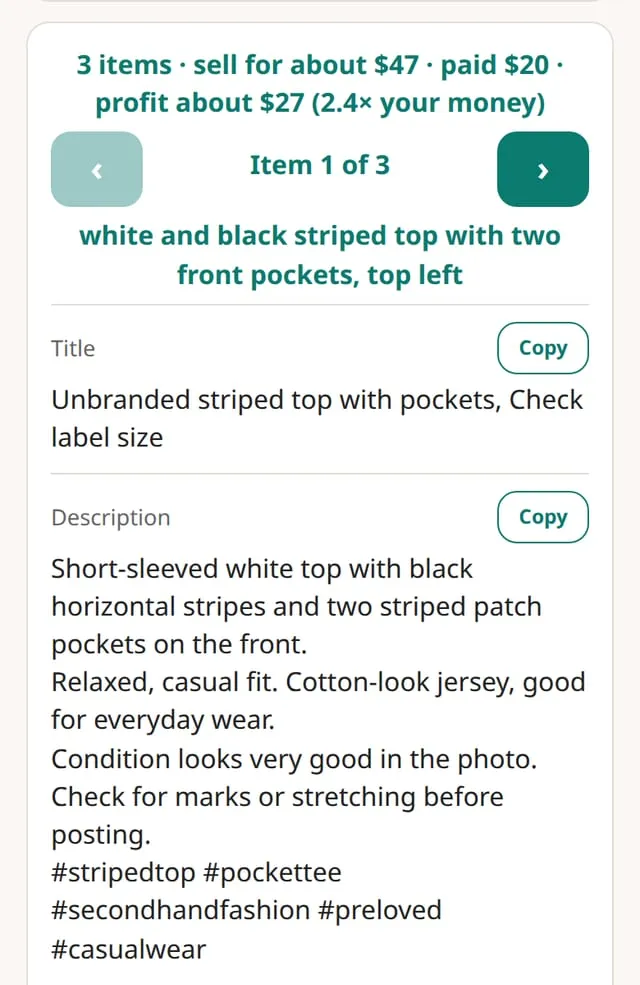
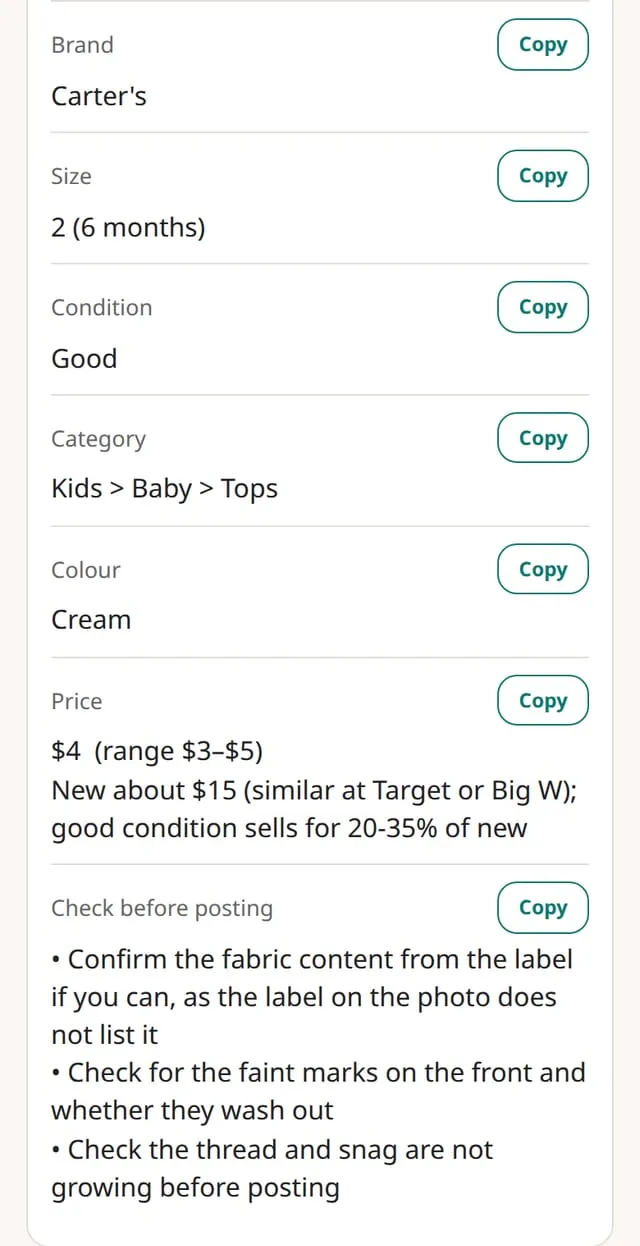
Back on the phone you get a card per item, with a copy button on every field. With more than one item there are arrows to step through them, or you can swipe.
The script doesn’t save the photos. They’re held in memory long enough to send to the AI, and the only record is one line in a log saying how many photos came in and how many listings went out. They do go to the AI service to be read, so don’t send it anything you wouldn’t send to one.
What you need
- A computer that’s always on: a home server, a mini PC or a Raspberry Pi, with Python 3 (mine is 3.12). The script uses nothing outside Python’s standard library.
- An OpenRouter account and API key: openrouter.ai. OpenRouter is one account
that gives you many AI models. Make a key just for this and put a monthly spending limit on it. A dollar
or two is plenty. The model used is
anthropic/claude-haiku-5.5. - A phone with a web browser.
- A way for the phone to reach that computer. That’s the next section.
Wiring
There are no wires. The thing to get right is how the phone reaches the page, because every tap on the button spends a little of your AI credit, and you want to be the only one tapping it.
There are two sensible ways, and one setting in the settings file picks between them.
At home only. Set LISTEN=0.0.0.0 and the page is open to anything on your home network. On the
phone, on your Wi-Fi, you go to http:// followed by the computer’s network address and :8740. It’s the
simple way. It’s also plain http, so the passcode crosses your network unscrambled. That’s fine on your
own Wi-Fi. Don’t do it on a network you share with people you don’t know.
From anywhere, through a tunnel with a login. Leave LISTEN=127.0.0.1, which means “this computer
only”, and put a tunnel in front of it. A tunnel gives the page a proper https address without opening
anything on your router, and a good one makes people log in before they reach the page at all. Mine is a
Cloudflare Tunnel with Cloudflare Access, set to let in two email addresses. This is the one I use.
Don’t forward a port on your router to it. The passcode is there as a second lock, not as a front door on the open internet.
To be straight about what I’ve tested: my own copy sits behind that tunnel and has no passcode, because the login does that job. I added the passcode for this version so it’s safe to run without one. I tested this exact file from a phone-sized browser on a computer, over plain http and on the machine itself, and checked that the home-network setting really does open the page to the network. I haven’t run this cut-down file behind my tunnel, or from a real phone.
Firmware and config
There’s no firmware. It’s one script and one settings file, plus a few lines to keep it running.
The settings file
Secrets live here, not in the code. Save it as ~/.config/listing-writer/env, make it readable only by
you (chmod 600) and fill in your own values:
OPENROUTER_API_KEY=your-openrouter-key
PASSCODE=pick-a-long-passcode
LISTEN=127.0.0.1
PORT=8740
The passcode has to be at least eight characters or the script won’t start. You type it once on the phone and the page remembers it.
The script
This is a cut-down version of what runs on my server, with the passcode added. I ran this exact file against the real AI model, with real photos, before publishing it. The part you edit is the block near the top.
#!/usr/bin/env python3
"""listing_writer.py: photos of secondhand clothes in, ready-to-paste listings out.

A small web page for your phone. Pick photos, tap the button, and an AI writes a title, description,
brand, size, condition and price for each item, with a copy button on every field. Give it a photo of
a whole bundle and it writes a listing for each piece. Tell it what you paid and it shows the profit.
Nothing is posted anywhere and the photos are never saved: you copy, paste and check.

  python3 listing_writer.py     then open http://localhost:8740 in a browser
"""
import hmac, json, re, time, urllib.request
from http.server import BaseHTTPRequestHandler, ThreadingHTTPServer
from pathlib import Path

# ---------- secrets and settings come from a file, never the code ----------
CFG = dict(line.strip().split("=", 1) for line in (Path.home() / ".config/listing-writer/env").read_text().splitlines()
           if "=" in line and not line.lstrip().startswith("#"))
KEY = CFG["OPENROUTER_API_KEY"]
PASSCODE = CFG["PASSCODE"]                       # typed once on the phone; stops anyone else spending your AI credit
LISTEN = CFG.get("LISTEN", "127.0.0.1")          # 127.0.0.1 = this computer only. 0.0.0.0 = anything on your network
PORT = int(CFG.get("PORT", "8740"))

# ---------- the part you edit ----------
SELL_ON = "Vinted"                               # only used in the instructions to the AI
COUNTRY = "Australia"
CURRENCY = "AUD"
EVERYDAY_STORES = "Kmart, Target, Big W, Best & Less, Cotton On"    # where unbranded clothes are compared to
# Secondhand price = this share of the NEW price, by condition (lowest, highest). Tune it to what sells for you.
CONDITION_SHARE = {"new with tags": (0.50, 0.70), "new without tags": (0.40, 0.55), "very good": (0.30, 0.45),
                   "good": (0.20, 0.35), "satisfactory": (0.10, 0.20)}
MIN_PRICE = 3                                    # never price below this
MAX_LISTINGS = 12                                # most listings from one go
MAX_PER_DAY = 150                                # a cap on AI calls per day, on top of the limit on the key
MAX_BODY = 12 * 1024 * 1024                      # biggest upload accepted, in bytes
MODEL = "anthropic/claude-haiku-5.5"

SYSTEM = f"""You write {SELL_ON} listings for someone who resells secondhand clothes in {COUNTRY}. You get photos,
maybe the seller's notes, and a MODE.
MODE single: the photos show one item; write one listing.
MODE split: the photos show several items (often a bulk lot laid out together); write ONE listing PER distinct
garment or pair of shoes, each priced on its own.
MODE bundle: write one listing selling everything together.
MODE auto: if you can see several distinct garments, or the notes ask to price or sell them individually, use
split; otherwise single.
Write what a careful, honest seller would write. Read the brand and size from labels in the photos when you can
see them. If you can't, say so (brand "Unbranded" or "Check label", size "Check label"). Point out visible flaws
honestly. Use the spelling of {COUNTRY}. No emojis in the title.
Reply with ONLY a JSON object {{"mode": "single"|"split"|"bundle", "listings": [ ... ]}} where each listing is
{{"where": for split, where the item is in the photo, e.g. "grey tee, top left" (else ""),
"title": up to 60 characters: brand + item + size + one key feature,
"description": 3-6 short lines: what it is, fit or style, material if known, condition with any flaws,
measurements only if given in the notes, then 3-5 relevant hashtags on the last line,
"brand": text, "size": text,
"condition": one of "New with tags"|"New without tags"|"Very good"|"Good"|"Satisfactory",
"category": a path like "Women > Tops > T-shirts", "colour": text, "material": text or "",
"rrp_new": your best estimate of what this item costs BRAND NEW in {COUNTRY}, in {CURRENCY} (a number). If you
can't see the brand, estimate what a SIMILAR new item costs at the everyday store it most looks like
({EVERYDAY_STORES}...) and say so in rrp_where, e.g. "similar at Target". Only use null if you can't tell what
the item is,
"rrp_where": where it's sold new, e.g. a brand's own store,
"price_low": number, "price_high": number, "price_suggest": number,
"check": a list of things the seller should check before posting (may be empty)}}.
At most {MAX_LISTINGS} listings. In split mode keep each description to 2-4 lines.
The three prices are your estimate for a quick secondhand sale. You have no sales data, so keep them modest."""

PAGE = r"""<!doctype html><html lang="en"><head><meta charset="utf-8">
<meta name="viewport" content="width=device-width, initial-scale=1"><title>Listing writer</title>
<style>
:root{--bg:#faf7f5;--fg:#222;--muted:#666;--card:#fff;--accent:#0b7a6f;--line:#e4ddd8}
@media (prefers-color-scheme:dark){:root{--bg:#151515;--fg:#eee;--muted:#aaa;--card:#202020;--accent:#3cc1b2;--line:#333}}
*{box-sizing:border-box}
body{margin:0;background:var(--bg);color:var(--fg);font:16px/1.45 system-ui,sans-serif}
main{max-width:560px;margin:0 auto;padding:16px}
h1{font-size:1.4em;margin:.2em 0 .6em}
.card{background:var(--card);border:1px solid var(--line);border-radius:14px;padding:14px;margin:12px 0}
label{display:block;font-weight:600;margin:.6em 0 .3em}
textarea,select,input{width:100%;padding:10px;border-radius:10px;border:1px solid var(--line);
  background:var(--bg);color:var(--fg);font:inherit}
textarea{min-height:64px}
button{font:inherit;border:0;border-radius:12px;padding:12px 16px;background:var(--accent);color:#fff;font-weight:600}
button:disabled{opacity:.4}
button.ghost{background:transparent;color:var(--accent);border:1px solid var(--accent);padding:6px 12px;font-size:.9em}
#go{width:100%;margin-top:12px}
#thumbs{display:flex;gap:6px;flex-wrap:wrap;margin-top:8px}
#thumbs img{width:64px;height:64px;object-fit:cover;border-radius:8px}
.nav{display:flex;align-items:center;justify-content:space-between;gap:8px;margin-bottom:6px}
.nav button{min-width:56px;font-size:1.3em;padding:8px 14px}
.top{color:var(--accent);font-weight:600;text-align:center;margin-bottom:6px}
.field{border-top:1px solid var(--line);padding:10px 0}
.k{display:flex;justify-content:space-between;align-items:center;color:var(--muted);font-size:.85em;margin-bottom:4px}
.v{white-space:pre-wrap;word-break:break-word}
.muted{color:var(--muted);font-size:.9em}
.err{color:#c0392b}
</style></head><body><main>
<h1>Listing writer</h1>
<div class="card">
<label for="pass">Passcode</label>
<input id="pass" type="password" autocomplete="current-password">
<label for="photos">Photos (front, back, label, any flaws)</label>
<input id="photos" type="file" accept="image/*" multiple>
<div id="thumbs"></div>
<label for="mode">What's in the photos?</label>
<select id="mode">
<option value="auto">Work it out for me</option>
<option value="single">One item</option>
<option value="split">Several items: a listing for each</option>
<option value="bundle">Several items: sell together as one bundle</option>
</select>
<label for="paid">What did you pay? (optional, for profit)</label>
<input id="paid" type="number" inputmode="decimal" min="0" step="0.01" placeholder="total paid including postage, e.g. 17.50">
<label for="notes">Notes (optional)</label>
<textarea id="notes" placeholder="e.g. small mark on left sleeve, pit to pit 52 cm, smoke free home"></textarea>
<button id="go">Write the listing</button>
<p class="muted" id="status"></p>
</div>
<div id="out"></div>
<p class="muted">Nothing is posted anywhere. Copy what you want into your selling app and check it first.
Prices are worked out from the new price and the condition, not from real sales.</p>
</main><script>
const $ = s => document.querySelector(s);
const el = (tag, cls, text) => { const e = document.createElement(tag); if (cls) e.className = cls;
  if (text != null) e.textContent = text; return e };
const money = n => '$' + (Math.round(n * 100) / 100).toFixed(2).replace(/\.00$/, '');
let imgs = [], items = [], at = 0, paid = 0;
try { $('#pass').value = localStorage.getItem('pass') || '' } catch (_) {}

// Shrink each photo on the phone before sending it: a smaller upload, and quicker and cheaper for the AI to read.
function shrink(file) {
  return new Promise((ok, bad) => {
    const r = new FileReader();
    r.onerror = bad;
    r.onload = () => {
      const im = new Image();
      im.onerror = bad;
      im.onload = () => {
        const s = Math.min(1, 1280 / Math.max(im.width, im.height));
        const c = el('canvas');
        c.width = Math.round(im.width * s); c.height = Math.round(im.height * s);
        c.getContext('2d').drawImage(im, 0, 0, c.width, c.height);
        ok(c.toDataURL('image/jpeg', 0.82));
      };
      im.src = r.result;
    };
    r.readAsDataURL(file);
  });
}

$('#photos').addEventListener('change', async e => {
  imgs = []; $('#thumbs').replaceChildren();
  for (const f of [...e.target.files].slice(0, 6)) {
    try { const d = await shrink(f); imgs.push(d); const t = new Image(); t.src = d; $('#thumbs').append(t) } catch (_) {}
  }
  $('#status').textContent = imgs.length ? imgs.length + ' photo(s) ready' : '';
});

async function copy(text, btn) {
  let ok = false;
  try { await navigator.clipboard.writeText(text); ok = true }
  catch (_) {                    // a plain http page isn't allowed the clipboard: fall back to the old way
    const t = el('textarea'); t.value = text; t.style.position = 'fixed'; t.style.opacity = 0;
    document.body.append(t); t.select();
    try { ok = document.execCommand('copy') } catch (_) {}
    t.remove();
  }
  btn.textContent = ok ? 'Copied ✓' : 'Press and hold the text';
  setTimeout(() => btn.textContent = 'Copy', 1500);
}

function field(name, shown, copied) {
  const d = el('div', 'field'), k = el('div', 'k', name), b = el('button', 'ghost', 'Copy');
  b.onclick = () => copy(String(copied == null ? shown : copied), b);
  k.append(b); d.append(k, el('div', 'v', shown));
  return d;
}

function show() {
  const j = items[at], c = el('div', 'card');
  if (paid > 0 || items.length > 1) {
    const sum = items.reduce((a, x) => a + (+x.price_suggest || 0), 0);
    c.append(el('div', 'top', items.length + ' item' + (items.length > 1 ? 's' : '') + ' · sell for about ' + money(sum) +
      (paid > 0 ? ' · paid ' + money(paid) + ' · profit about ' + money(sum - paid) +
        ' (' + (sum / paid).toFixed(1) + '× your money)' : '')));
  }
  if (items.length > 1) {
    const n = el('div', 'nav'), p = el('button', '', '‹'), q = el('button', '', '›');
    p.disabled = at === 0; p.onclick = () => { at--; show() };
    q.disabled = at === items.length - 1; q.onclick = () => { at++; show() };
    n.append(p, el('div', 'top', 'Item ' + (at + 1) + ' of ' + items.length), q); c.append(n);
  }
  if (j.where) c.append(el('div', 'top', j.where));
  c.append(field('Title', j.title), field('Description', j.description), field('Brand', j.brand),
    field('Size', j.size), field('Condition', j.condition), field('Category', j.category), field('Colour', j.colour));
  if (j.material) c.append(field('Material', j.material));
  c.append(field('Price', '$' + j.price_suggest + '  (range $' + j.price_low + '–$' + j.price_high + ')\n' + j.price_basis,
    j.price_suggest));
  if (paid > 0) {
    const share = paid / items.length, profit = j.price_suggest - share;
    c.append(field('Profit', money(j.price_suggest) + ' price − ' + money(share) + ' cost share = ' + money(profit) +
      (profit < 0 ? '  ⚠️ loss' : '')));
  }
  if (j.check.length) c.append(field('Check before posting', '• ' + j.check.join('\n• ')));
  $('#out').replaceChildren(c);
}

let sx = null;                   // swipe left and right between items
document.addEventListener('touchstart', e => { sx = e.touches[0].clientX }, {passive: true});
document.addEventListener('touchend', e => {
  if (sx === null || items.length < 2) return;
  const dx = e.changedTouches[0].clientX - sx; sx = null;
  if (dx < -70 && at < items.length - 1) { at++; show() } else if (dx > 70 && at > 0) { at--; show() }
}, {passive: true});

$('#go').addEventListener('click', async () => {
  if (!imgs.length) { $('#status').textContent = 'Pick at least one photo first.'; return }
  $('#go').disabled = true; $('#out').replaceChildren();
  $('#status').textContent = 'Writing… (10 to 40 seconds, longer for a big lot)';
  try {
    const r = await fetch('api/write', {method: 'POST',
      headers: {'Content-Type': 'application/json', 'X-Passcode': $('#pass').value},
      body: JSON.stringify({images: imgs, notes: $('#notes').value, mode: $('#mode').value})});
    const txt = await r.text();
    let j;                       // the reply might not be JSON at all if something in between replaced it
    try { j = JSON.parse(txt) } catch (_) { throw new Error('The server had a hiccup (' + r.status + '). Try again.') }
    if (!r.ok) throw new Error(j.error || 'error ' + r.status);
    try { localStorage.setItem('pass', $('#pass').value) } catch (_) {}
    items = j.listings; at = 0; paid = parseFloat($('#paid').value) || 0; show();
    $('#status').textContent = items.length > 1 ? items.length + ' listings: use the arrows (or swipe) to go through them.'
      : 'Done. Pick new photos for the next item.';
  } catch (e) { $('#status').replaceChildren(el('span', 'err', e.message)) }
  finally { $('#go').disabled = false }
});
</script></body></html>"""


def price_from_new(l):
    """Set the three prices from the estimated new price. Keep the AI's own guess only if there isn't one."""
    try:
        new = float(l.get("rrp_new") or 0)
    except (TypeError, ValueError):
        new = 0
    share = CONDITION_SHARE.get(l["condition"].lower())
    if new > 0 and share:
        low, high = max(MIN_PRICE, round(new * share[0])), max(MIN_PRICE, round(new * share[1]))
        where = l["rrp_where"]
        where = "" if not where else f" ({where})" if where.lower().startswith("similar") else f" at {where}"
        l.update(price_low=low, price_high=high, price_suggest=round((low + high) / 2),
                 price_basis=f"New about ${round(new)}{where}; {l['condition'].lower()} condition sells for "
                             f"{round(share[0] * 100)}-{round(share[1] * 100)}% of new")
    else:
        l["price_basis"] = "The AI's own guess (it couldn't place the new price)"
    for k in ("price_low", "price_high", "price_suggest"):
        try:
            l[k] = max(MIN_PRICE, round(float(l.get(k) or 0)))
        except (TypeError, ValueError):
            l[k] = MIN_PRICE
    return l


def write_listings(images, notes, mode):
    mode = mode if mode in ("auto", "single", "split", "bundle") else "auto"
    content = [{"type": "text", "text": f"MODE: {mode}\nSeller's notes: " + (notes.strip()[:500] or "(none)")}]
    content += [{"type": "image_url", "image_url": {"url": u}} for u in images[:6]]
    body = {"model": MODEL, "max_tokens": 6000, "reasoning": {"effort": "low"},
            "messages": [{"role": "system", "content": SYSTEM}, {"role": "user", "content": content}]}
    req = urllib.request.Request("https://openrouter.ai/api/v1/chat/completions", data=json.dumps(body).encode(),
                                 headers={"Authorization": f"Bearer {KEY}", "Content-Type": "application/json",
                                          "X-Title": "Listing writer"})
    j = None
    for _ in range(2):                                       # one more try if the reply isn't usable
        out = json.loads(urllib.request.urlopen(req, timeout=85).read())["choices"][0]["message"]["content"] or ""
        m = re.search(r"[\[{].*[\]}]", out, re.S)
        try:
            j = json.loads(m.group(0)) if m else None
        except ValueError:
            j = None
        if j:
            break
    if isinstance(j, list):                                  # it sent a bare list of listings
        j = {"mode": "split", "listings": j}
    elif isinstance(j, dict) and "listings" not in j:        # it sent one listing on its own
        j = {"mode": "single", "listings": [j]}
    listings = []
    for l in (j or {}).get("listings", [])[:MAX_LISTINGS]:
        if not isinstance(l, dict):
            continue
        for k in ("where", "title", "description", "brand", "size", "condition", "category", "colour", "material",
                  "rrp_where"):
            l[k] = str(l.get(k) or "").strip()
        l["check"] = [str(x) for x in (l.get("check") or [])][:6]
        listings.append(price_from_new(l))
    if not listings:
        raise ValueError("the AI didn't return a listing")
    return {"mode": j.get("mode", "single"), "listings": listings}


COUNT = {"day": "", "n": 0}


class Handler(BaseHTTPRequestHandler):
    def send(self, code, body, ctype="application/json"):
        data = (body if isinstance(body, str) else json.dumps(body)).encode()
        self.send_response(code)
        self.send_header("Content-Type", ctype)
        self.send_header("Content-Length", str(len(data)))
        self.send_header("Cache-Control", "no-store")
        self.end_headers()
        self.wfile.write(data)

    def do_GET(self):
        if self.path.split("?")[0] == "/":
            return self.send(200, PAGE, "text/html; charset=utf-8")
        self.send(404, {"error": "not found"})

    def do_POST(self):
        if self.path.split("?")[0] != "/api/write":
            return self.send(404, {"error": "not found"})
        n = int(self.headers.get("Content-Length") or 0)
        if n <= 0 or n > MAX_BODY:
            return self.send(413, {"error": "Those photos are too big."})
        raw = self.rfile.read(n)
        if not hmac.compare_digest(self.headers.get("X-Passcode", "").encode(), PASSCODE.encode()):
            time.sleep(1)                                    # slows down anyone guessing
            return self.send(403, {"error": "Wrong passcode."})
        day = time.strftime("%F")
        if COUNT["day"] != day:
            COUNT.update(day=day, n=0)
        if COUNT["n"] >= MAX_PER_DAY:
            return self.send(429, {"error": "Daily limit reached. Try tomorrow."})
        COUNT["n"] += 1
        try:
            req = json.loads(raw)
            images = [u for u in req.get("images", []) if isinstance(u, str) and u.startswith("data:image/")]
            if not images:
                return self.send(400, {"error": "No photos arrived."})
            t0 = time.time()
            j = write_listings(images, str(req.get("notes", "")), str(req.get("mode", "auto")))
            print(time.strftime("%F %T"), j["mode"], len(images), "photo(s) ->", len(j["listings"]), "listing(s) in",
                  f"{time.time() - t0:.0f}s", flush=True)
            self.send(200, j)
        except Exception as e:
            print(time.strftime("%F %T"), "error", type(e).__name__, str(e)[:200], flush=True)
            # 4xx on purpose, not 5xx: a tunnel or proxy in front may swap a 5xx reply for its own error page
            self.send(422, {"error": "Couldn't write it that time. Try again, maybe with clearer photos."})

    def log_message(self, *a):                               # no access log: nothing about the photos is kept
        pass


if __name__ == "__main__":
    if len(PASSCODE) < 8:
        raise SystemExit("PASSCODE in the settings file needs to be at least 8 characters.")
    print(f"Listing writer on http://{LISTEN}:{PORT}", flush=True)
    ThreadingHTTPServer((LISTEN, PORT), Handler).serve_forever()
A few things in there that matter more than they look:
CONDITION_SHAREis the pricing. Each condition has a lowest and highest share of the new price, and the suggested price is the middle of the two. These numbers are my starting guess, not research. Change them to what actually sells for you.EVERYDAY_STORESis for clothes with no brand. The AI is told to price those against a similar new item at one of these shops, and to say which. Put in the shops where you live.MAX_PER_DAYis a second limit on spending, behind the monthly limit on the key. It’s counted in memory, so it starts again from zero if the script restarts.- Every failure comes back as a 422 with a plain message, never a 500. That looks odd, and it’s deliberate. It’s in the lessons.
Keeping it running
To have it start with the computer and restart if it falls over, make it a service. Save this as
/etc/systemd/system/listing-writer.service, with your own user name and paths:
[Unit]
Description=Listing writer
After=network-online.target

[Service]
User=your-user
WorkingDirectory=/home/your-user/listing-writer
ExecStart=/usr/bin/python3 -u /home/your-user/listing-writer/listing_writer.py
Restart=always
RestartSec=5

[Install]
WantedBy=multi-user.target
Then:
sudo systemctl daemon-reload
sudo systemctl enable --now listing-writer
journalctl -u listing-writer -f
The last line shows the log as it happens. My own copy runs under a unit like this one. For the tests in this guide I ran the cut-down file by hand.
What it costs
OpenRouter reports what each call cost, so these are measured, not estimated:
| What I sent | What came back | Time | Cost |
|---|---|---|---|
| One photo of three tops | 3 listings | 11 s | US$0.0012 |
| The same, plus three more photos | 3 listings | not timed | US$0.0019 |
| One photo of a 12-piece bundle | 12 listings | 17 s | US$0.0022 |
So the biggest job it will do costs about a fifth of a US cent, and each extra photo adds about two hundredths of a cent. Fifty bundles a month would be eleven US cents. The writing costs more than the reading: twelve listings is a lot of words, and that’s most of the bill. I didn’t measure a true one-item, one-photo go on its own. It’ll be under the first row.
Step by step
- Make an OpenRouter key with a monthly limit.
- Make the settings file and
chmod 600it. Pick a passcode of eight characters or more. - Save the script as
~/listing-writer/listing_writer.py. EditSELL_ON,COUNTRY,CURRENCYandEVERYDAY_STORESto suit, and look overCONDITION_SHARE. - Run it by hand:
python3 listing_writer.py. It printsListing writer on http://127.0.0.1:8740. - On that same computer, open
http://localhost:8740in a browser. Type the passcode, pick a photo of one piece of clothing and press Write the listing. A single item took about five seconds for me. - Decide how the phone will reach it (see Wiring) and set
LISTENto match. - Set up the service so it stays running.
- Open the page on the phone and add it to the home screen, so it opens like an app.
Testing it
-
One item first. I gave it one photo of a kids’ T-shirt from a brand with its own stores. Six seconds later it had a title, a description and this under the price:
$7  (range $5–$9)
New about $25 at Seed Heritage stores and seedheritage.com; good condition sells for 20-35% of new
Its check list for that one included “Confirm the size on the label, which is partly hidden in the photo”. That’s the behaviour you want: it says what it couldn’t see.
-
Then a bundle. One photo of a 12-piece boys’ lot, with 25 typed into “What did you pay?”, came back in under 19 seconds with this across the top:
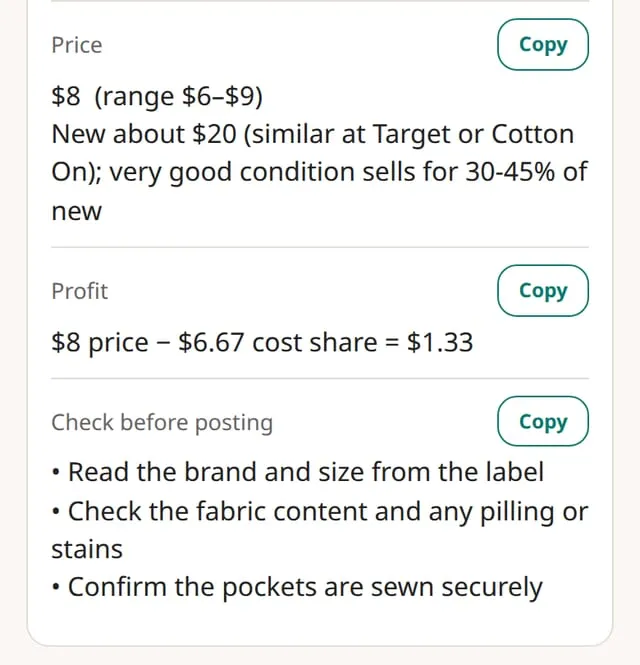
10 items · sell for about $57 · paid $25 · profit about $32 (2.3× your money)Ten, not twelve. That’s in the lessons. Each card also shows its own share, like
$7 price − $2.50 cost share = $4.50. -
Paste something. Tap Copy on the title, then paste it into the notes box. The price copies as the bare number, with no dollar sign, so it drops straight into a price field.
-
Type a wrong passcode once. The page should say “Wrong passcode.” after a one-second pause.
-
Watch the log while you test. A good go prints a line like this:
2026-11-10 21:20:58 single 1 photo(s) -> 1 listing(s) in 6sIf the phone says “Couldn’t write it that time”, the real reason is in the log. With a bad key, mine said
error HTTPError HTTP Error 401: Unauthorized.
About the pictures. The screenshots on this page are the real page with real answers from the AI, taken in a phone-sized browser window on a computer. The photos I fed it for them are free-to-use ones, not our stock and not a seller’s: a baby singlet and its label from the Missouri Historical Society (public domain), and “Outfit” by Toa Heftiba (CC0), both from Wikimedia Commons. They’re different items from the T-shirt and the bundle in the tests above.
Lessons learnt
Let the AI find the new price, and let code set yours. The first version asked the AI for a selling price outright. It has no sales data, so that was a confident guess. What it can do well is recognise the item and say what it costs new. So now it does that, and the secondhand price is a share of that number from a table I control. Every price shows its working, which makes a wrong one easy to spot.
The same photo can give two prices. I ran one T-shirt photo twice. Once it was “good” condition, about $25 new, so $7. Once it was “very good”, about $35 new, so $13. Nearly double, from the same picture. The table makes the arithmetic steady, but the two things feeding it are still judgement calls. Treat the price as a starting point and set the condition yourself.
A bundle photo broke the first version. It was built for one item at a time. The first time it got a photo of a whole lot with a note asking for each piece to be priced, it returned nothing usable. That’s where the “What’s in the photos?” choice came from, and the rule that a reply can be a list.
The error page that wasn’t mine. When that failed, the phone showed Unexpected token '<'. My script
had answered with a 502 error and a tidy message. The tunnel in front of it saw the 502, threw my message
away and sent its own error page, which is HTML, to a page expecting JSON. So now every failure goes back
as a 422, which gets passed through untouched, and the page copes if what comes back isn’t JSON at all.
It only knows what’s in the photo. With no notes, every size on that boys’ lot came back as “Check label”, and the titles ended with the words “Size Check label”. With one line of notes, “All boys size 6. Smoke free home.”, every listing had the size, the titles said “Boys Size 6” and the smoke-free line was in each description. One line of notes fixed every listing at once.
It can’t count a pile. The same photo of that 12-piece lot, run five times, came back as 10, 12, 10, 11 and 11 listings. My guess is that pieces lying over each other get merged or missed, so gaps between them should help, but I haven’t tested that. Count the cards against the pile before you trust the profit line.
“One item” is a suggestion. I set it to “One item” and gave it a photo showing three T-shirts side by side. It wrote three listings, twice running. I’d rather that than three shirts squashed into one listing, but know that the model’s eyes can overrule the menu.
It will read a brand off the front of a shirt. One top came back with the brand “Little”, which looks like a word from the print on the chest, not from a label. A photo of the actual label is the fix, and “Brand” is always worth a second look.
Shrink the photos on the phone. Six full-size photos is a slow upload on mobile data, and the AI gets nothing I could see from them: it read labels fine at 1280 pixels in my tests. Doing it in the browser also means the big originals never leave the phone.
Copy buttons need a fallback. Browsers only allow the modern way of copying on an https page (or on the computer itself). Over plain http on home Wi-Fi it simply isn’t there, and a copy button that does nothing is the whole tool broken. The page tries the modern way, then falls back to the old one. I tested both: the old way pasted the exact title back.
Why it doesn’t post. I couldn’t find a way to post to Vinted that’s open to a hobby project, and driving the app with a robot risks the account the whole exercise depends on. It also shouldn’t. It gets sizes, counts and brands wrong often enough that a person needs to read every listing. Copy and paste is the review step.
The profit line is rough. It splits what you paid evenly across the items, so a $2.50 share lands on the nice jacket and the plain singlet alike. It knows nothing about selling fees or about postage you end up covering. It answers “is this lot worth the effort”, not “what did I make”.
Anything that spends money per tap needs a lock. This page has three: the passcode (or a login in front), the daily cap in the script, and the monthly limit on the key. The last one is the one that can’t have a bug in it. Set it first.
Questions and comments
Loading comments…